
How it was made · · 10 min read
Making text almost free to draw in LÖVE
Vaporware EX is a game that contains SO much text, and the most intuitive way of displaying text in LÖVE redraws a string from scratch every time you print it. Here's how, with LÖVE's TextBatch and a cache, drawing it went from a big slice of every frame to a fraction of a millisecond.
Vaporware EX contains a lot of text. It's a mock operating system, it incorporates both strategy and RPG mechanics into its design, and it's almost entirely composed of UI. Drawing all of that the obvious way, using love.graphics.print turned out to be surprisingly expensive. This post is about a caching technique I adapted to create a bespoke version of printing that is a lot cheaper, the process that lead to its creation, and a small standalone version you can drop into your own LÖVE game.
Why print is slow#
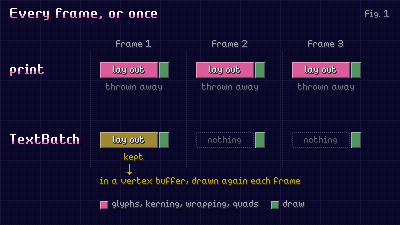
love.graphics.print and printf are stateless function calls. They start from nothing, looks up each character's glyphs, applies kerning, breaks the lines if a wrap width is provided, parses the colours if a colored text table is provided, and builds a quad for every letter. These quads are then drawn, and everything involved is thrown away. On the next frame, the same process repeats, over and over again.
Using a TextBatch (also known as Text before LÖVE 12), this work is cut down significantly because the work is done once, stored in a vertex buffer, and kept for as long as you hold on to the batch. Way, way faster.
For perspective, drawing around 300 short strings a frame yields the following numbers:
print: 1.6ms/frameprintf, with a wrap width: 3.0ms/frameprint, with a colored-text table: 1.7ms/frame, plus 108KB of garbage every frame for the collector to clean upTextBatch: 0.13ms/frame
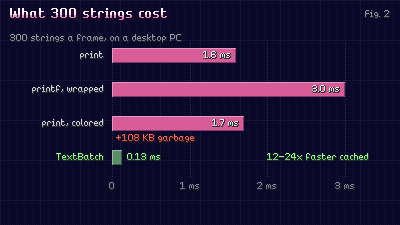
That's on LÖVE 12 with its default font, on a desktop PC. A 60 fps frame has 16.7 ms in it, so uncached text alone could take 10-18% of it. Cached, the same text costs under 1%.
But there's a catch: TextBatch objects are only useful if you hold onto them. If you make one, draw it once, and discard it, you've done all the work of print, plus you've allocated a GPU buffer to boot. So it isn't a matter of "should I use TextBatches", it's a matter of "which strings deserve one, and for how long?"
The first cache#
It started off as a pretty simple system. I created a new static object, textManager, and added a method to form textManager:Print, to replace all calls of love.graphics.print in the codebase. As an added bonus, I was able to use optional args to allow it to operate as printf contextually, based on what the caller provides, so every single invocation now went through a single channel under my control.
It kept a table per font, indexed using a constructed key consisting of the text, a wrap width if provided, and text alignment, if provided. Each entry in the font table would consist of a tuple table made up of the constructed TextBatch, and the "tick" it was last drawn on. Once we reached an upper bound (2,000 entries), it searched for the entry with the oldest tick, and dropped it. This meant that if something hadn't been drawn in a while, it was discarded, to be constructed again if ever it became relevant to the game state again.
function textManager:MakeKey(text, w, align)
    return tostring(w or 0) .. "|" .. tostring(align or "") .. "|" .. text
end
This did the trick, and made the game faster, but it also caused three problems, found piecemeal throughout development.
Strings you only see once#
The first problem was, what if you print something, and it only exists for a single frame? Think about money counting up after a sale, or a progress percentage, or a timer. Each new value printed is a brand new string printed to the screen, so each one resulted in a new TextBatch in the cache that would never be drawn again. Even worse, in some scenarios, they would push strings that were being reused out of the cache.
The fix is to make the string prove it deserves a batch. On first print of a string, the cache notes it and watches its career with great interest, but otherwise lets it go through the slow path, printing the old fashioned way. Only on the second print does it get promoted to the coveted status of TextBatch, and popped in the cache. A label onscreen for a few seconds is drawn hundreds and hundreds of times, so it pays for the cost of its batch creation almost immediately. A counter that changes constantly, every frame, never gets promoted, and never costs a buffer.
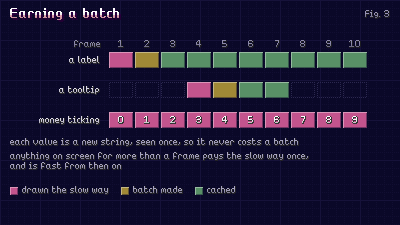
This list of "seen once" strings needs a limit of its own, or every counter value ever seen accumulates, leading to a table that only ever grows. So past 8,192 entries, the whole slate is wiped clean and the entire list is dropped. Forgetting a string that's been seen once before only ever costs one slow draw call at worst, so it's a good compromise.
There's also a noCache flag for text I know for sure is always changing. One of the coding montages, where you watch your developer typing out assembly code, used to make a TextBatch for every line typed. But at 40 lines a second, it piled up GPU buffers faster than the garbage collector could release them. It now reuses the line scrolling off the top instead.
Making the lookup cheap#
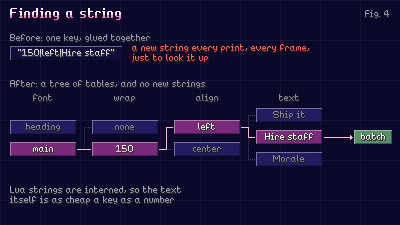
The second problem is the key. MakeKey joins three strings together to create a new string. This happened for every piece of text, ever frame, just to find out if the text was already cached. I was creating garbage in pursuit of saving work.
Lua strings are interned, so equal strings are the same object under the hood. Because of this, looking one up in a table is as cheap as looking up a number. So rather than building a combined key, as before, the cache changed into a tree of tables: first the font, then the wrap width, then the alignment, then whether to parse color tags, and finally the text itself, as the caller passed it. This means a handful of table reads (five in the game, four in the sample at the end of this post), and no new strings.
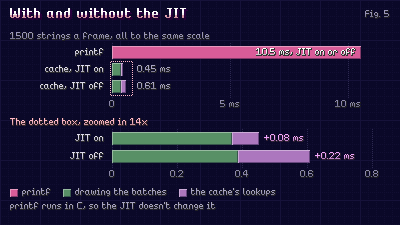
How cheap is "cheap"? It depends on LuaJIT's compiler. With the JIT on, as it is on a PC, those table reads compile down to a handful of machine instructions: looking up 1,500 strings a frame adds about 0.08 ms to drawing their batches. With the JIT off, the same lookups run through the interpreter and cost almost three times as much, about 0.22 ms. Some platforms can't run a JIT at all, so it's worth knowing the cache still holds up there: even without it, the lookups are a fiftieth of what printf costs for the same strings.
Coloured-text tables are harder to make into a key, so they're keyed by their contents written out as a string. This has a cost, but its rarely encountered. Almost all of the coloured text in Vaporware EX is written with tags in a plain string (spreadsheets) which keys itself.
Throwing things out without a hitch#
The third problem was eviction. Finding the oldest entry when all you've got is a table of tuples, consisting of the TextBatch and the tick, meant you'd need to iterate through all 2,000 of them, searching for the tuple with the oldest tick. Once the cache reaches 2,000, which inevitably happens after a short amount of time, this meant iterating all 2,000 tuples for every new string that came along.
The first fix attempt made things worse in a less obvious way. Instead of dropping an entry one at a time, the cache would sort every entry by age and drop the oldest 500 of 2,000 in one go. Less scans, but each one sorted 2,000 things and evicted 500. This meant a hitch of several milliseconds every 500 new strings added (up to 7ms in the benchmark below). Cheaper on average than before, but now instead of a consistently lower framerate, you had a faster average framerate, littered with spikes. On a busy frame, a spike like that is enough to drop it.
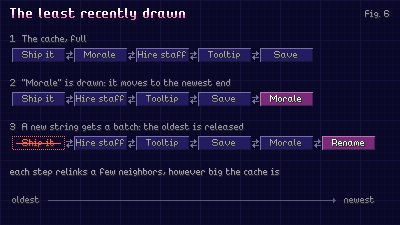
The actual fix is textbook: a Least-Recently-Used (LRU) list. Every cached string exists within a doubly-linked chain, oldest at one end, newest at the other. Drawing a string moves it to the newest end, evicting removes from the oldest end. Both take a tiny amount of work, however big the cache is, so eviction can happen one entry at a time, exactly when needed, and never creates stutters or spikes.
To illustrate what that bought, here's a comparison of the old quarter-at-a-time eviction next to the LRU in this post, running on a full cache with 300 strings kept, and 10 new ones a frame that come and go. You can see in the figure below exactly how different these approaches are. Up to 7ms every 500 strings with the old approach, and the LRU never reaches above 2ms.
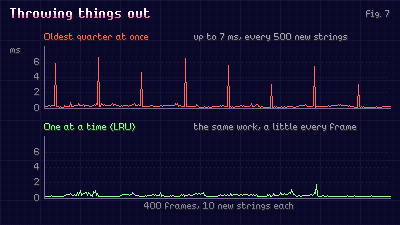
To be clear, the LRU isn't a perfect solution. The median frame actually got a little bit slower (0.33ms against 0.28ms), because 10 batch evictions per frame costs about the same as 500 batch evictions every 50 frames. However, the cost is spread evenly across frames, and an extra 0.05ms every frame is imperceptible, whereas a 7ms spike takes almost half of a 60 fps frame.
Additionally, if you don't release evicted batches and leave them to the garbage collector, as earlier iterations of this system did, it's worse still. The collector gets to hundreds at the same time, and those spikes reached 10-14ms. If you're done with a TextBatch, please for the love of god, call release() on it.
Widths too#
Drawing isn't the only text-relevant stuff done every frame. Anything, centered, right-aligned, or sized to fit a label measures its text first, and font:getWidth walks the whole string each time. So the game also remembers each string's width per font, up to 4,096 of them. Paragraph heights for wrapped text are memorized the same way in Lua: the panels and popups that size themselves around a paragraph were measuring it on each frame, and that alone was a third of the New Project Menu's frame time.
The one thing that is not cached is text being typed out. The typewriter animates each letter on its own (they wave, shake, pop in, etc.), so those are still worked out each frame. Once a line has fully landed and stopped moving though, it's drawn from a list of its still stretches rather than letter by letter.
A cache for your own game#
Here's the cache from this post as a standalone module, in plain Lua. It's written for LÖVE 11.5 and 12 (tested on 12), takes plain strings (you'll need to do your own keying if you use colored-text tables), and has the three fixes from above: the tree of tables, the seen-once cache, and the LRU eviction chain.
Here's the tree lookup and cache state:
-- textcache.lua: draws text through TextBatches kept for the strings drawn again and again
local TextCache = {}
TextCache.__index = TextCache

-- LÖVE 12 renamed Text to TextBatch
local newTextBatch = love.graphics.newTextBatch or love.graphics.newText

local SEEN_MAX = 8192 -- strings drawn once but not (yet) cached; forgotten past this

-- font -> wrap width -> alignment -> a table keyed by the text itself
local function leafOf(root, font, wrap, align)
    local byFont = root[font]
    if not byFont then
        byFont = {}
        root[font] = byFont
    end
    local byWrap = byFont[wrap]
    if not byWrap then
        byWrap = {}
        byFont[wrap] = byWrap
    end
    local leaf = byWrap[align]
    if not leaf then
        leaf = {}
        byWrap[align] = leaf
    end
    return leaf
end

function TextCache.new(maxEntries)
    local cache = setmetatable({}, TextCache)
    cache.maxEntries = maxEntries or 2000
    cache.entries = 0
    cache.batches = {}
    cache.seenOnce = {}
    cache.seenCount = 0
    -- every cached string in a chain from the least recently drawn (oldest) to the most (newest)
    cache.oldest = nil
    cache.newest = nil
    return cache
end
Next, the LRU chain. Each cached string is a node that knows its older and newer neighbours, so moving or removing one never requires a search.
-- textcache.lua (part 2)
function TextCache:Unlink(node)
    if node.older then node.older.newer = node.newer else self.oldest = node.newer end
    if node.newer then node.newer.older = node.older else self.newest = node.older end
    node.older, node.newer = nil, nil
end

function TextCache:PushNewest(node)
    node.older = self.newest
    if self.newest then self.newest.newer = node else self.oldest = node end
    self.newest = node
end

function TextCache:EvictOldest()
    local node = self.oldest
    self:Unlink(node)
    node.leaf[node.text] = nil
    node.batch:release() -- hand the GPU buffer back now, not whenever the collector gets to it
    self.entries = self.entries - 1
end
And the glue that ties everything together: Print takes the same arguments as print, or printf, when given a wrap width.
-- textcache.lua (part 3)
-- nil the first time a string is seen: it's drawn the slow way, so a one-off never gets a TextBatch
function TextCache:GetBatch(text, font, wrap, align)
    wrap, align = wrap or false, align or "left"
    local leaf = leafOf(self.batches, font, wrap, align)
    local node = leaf[text]
    if node then
        if node ~= self.newest then
            self:Unlink(node)
            self:PushNewest(node)
        end
        return node.batch
    end

    local seen = leafOf(self.seenOnce, font, wrap, align)
    if not seen[text] then
        self.seenCount = self.seenCount + 1
        if self.seenCount > SEEN_MAX then
            self.seenOnce, self.seenCount = {}, 0
            seen = leafOf(self.seenOnce, font, wrap, align)
        end
        seen[text] = true
        return nil
    end
    seen[text] = nil

    local batch = newTextBatch(font)
    if wrap then
        batch:setf(text, wrap, align)
    else
        batch:set(text)
    end
    node = { text = text, leaf = leaf, batch = batch }
    leaf[text] = node
    self:PushNewest(node)
    self.entries = self.entries + 1
    if self.entries > self.maxEntries then
        self:EvictOldest()
    end
    return batch
end

-- the same as love.graphics.print, or printf when given a wrap width
function TextCache:Print(text, font, x, y, wrap, align)
    local batch = self:GetBatch(text, font, wrap, align)
    if batch then
        love.graphics.draw(batch, x, y)
    elseif wrap then
        love.graphics.printf(text, font, x, y, wrap, align or "left")
    else
        love.graphics.print(text, font, x, y)
    end
end

return TextCache
To illustrate the difference for yourself, main.lua draws 300 strings a frame and times them. Spacebar switches between the cache, and regular ol' printf. On my machine, I see 0.09ms for cached, and 2.3ms without.
-- main.lua: 300 strings a frame, drawn with printf or through the cache. Space switches
local TextCache = require("textcache")

local Demo = { lineCount = 300, useCache = true, sampleTime = 0, sampleFrames = 0, shownMilliseconds = 0 }

function Demo:Load()
    self.font = love.graphics.newFont(12)
    self.cache = TextCache.new()
    self.lines = {}
    local words = { "Ship", "the", "build", "Polish", "Bugs", "Morale", "Hype", "Engine", "Sound", "Design" }
    for index = 1, self.lineCount do
        local parts = {}
        for word = 1, 3 + index % 5 do
            parts[word] = words[(index * 7 + word * 3) % #words + 1]
        end
        self.lines[index] = table.concat(parts, " ")
    end
end

function Demo:DrawLines()
    for index, line in ipairs(self.lines) do
        local x = 8 + math.floor((index - 1) / 30) * 160
        local y = 40 + ((index - 1) % 30) * 18
        if self.useCache then
            self.cache:Print(line, self.font, x, y, 150, "left")
        else
            love.graphics.printf(line, self.font, x, y, 150, "left")
        end
    end
end

function Demo:Draw()
    local started = love.timer.getTime()
    self:DrawLines()
    self.sampleTime = self.sampleTime + love.timer.getTime() - started
    self.sampleFrames = self.sampleFrames + 1
    if self.sampleFrames == 60 then
        self.shownMilliseconds = self.sampleTime / self.sampleFrames * 1000
        self.sampleTime, self.sampleFrames = 0, 0
    end
    -- this changes every frame, so it's printed straight: caching it would only make a new batch a frame
    local mode = self.useCache and "cached" or "printf"
    love.graphics.print(string.format("%s: %.2f ms for %d strings (space to switch)", mode,
        self.shownMilliseconds, self.lineCount), self.font, 8, 10)
end

function love.load() Demo:Load() end
function love.draw() Demo:Draw() end
function love.keypressed(key)
    if key == "space" then
        Demo.useCache = not Demo.useCache
        Demo.sampleTime, Demo.sampleFrames = 0, 0
    end
end
What to take from it#
- Don't underestimate how expensive cheap things can be in large amounts.
- Make your cache enforce standards for what it caches. Sometimes caching too aggressively is worse than not caching at all.
- Watch out for the cost of cache lookups. If cache lookups create garbage, you're paying a price that may or may not be worth it.
- A slightly worse median framerate is better than spikes. Doing a little more on every frame is better than dropping a frame less frequently, but more noticeably.
The whole sample#
All 2 files from this post, put together: about 170 lines of plain Lua for LÖVE 11.5.
Run it as it is with love text-cache.zip, or unzip it and run love . in the folder.