
How it was made · · 15 min read
How to get a game to play itself
Vaporware EX can play itself for hours: a bot moves the mouse, presses the buttons, ships games, and writes down everything that broke along the way. Here's how that works in LÖVE, from taking over the clock and the input to catching crashes and stuck states, with a small sample you can run.
Start Vaporware EX with --autotest and it plays itself. A bot founds a studio, makes games and ships them, moving the cursor and clicking the same buttons you would. When something breaks, it writes it down, goes back to the title and starts again. I leave it running overnight and read the report in the morning: the crashes, the places it got stuck, and frame times for each screen.
This post covers how it works in LÖVE. It's all plain Lua, and there's a small version to download at the end.
Why play through the UI#
You could call the game's rules directly (StartProject(), Ship()) and check the numbers. That's fast, but players don't call Ship(). They hover, click, wait for menus to animate in and confirm things, and that layer has its own bugs, like a popup opening over another popup or a screen waiting for a press that can't happen. Vaporware's bot reads the game's state to decide what to do, but every action goes through the same input a player uses.
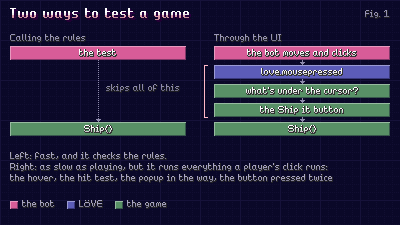
Playing through the UI is as slow as actually playing, though, so the first job is making time go faster without the game noticing.
Owning the clock#
A LÖVE game learns the time two ways: the dt passed to love.update, and love.timer.getTime(), which any code can call. Whoever calls love.update already controls dt. For the rest, remember that in Lua, love.timer.getTime is just a field in a table:
local virtualNow = 0
love.timer.getTime = function() return virtualNow end
Now every cooldown, animation, and "ignore clicks for half a second" in the game runs on the bot's clock. The bot then steps the game in frames that are always the same length:
for step = 1, stepsPerFrame do
    virtualNow = virtualNow + 1 / 60
    update(1 / 60)
end
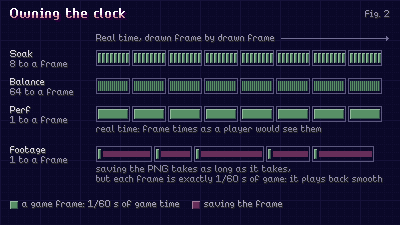
At 8 steps per drawn frame the game plays eight times as fast, and nothing skips: each step is still a whole 1/60 of a second to the game. Vaporware uses four settings:
- Soak (finding crashes): 8 game frames per drawn frame.
- Balance (tuning difficulty): 64, with montages and text instant. Eight games take about two and a half minutes, eight runs at once.
- Perf (frame times): 1, in real time, because only real time is honest about frame times.
- Footage: one 1/60 of game time per captured frame, however long saving the PNG takes, so a capture running at 10 fps plays back smooth at 60.
Fixed steps also mean the same seed plays out nearly the same way twice. Anything that reads the real clock or races a thread can nudge it, but usually "seed 11 crashes on day 40" is something I can go and watch.
Owning the input#
Input splits the same way. The game is told about events (love.mousepressed, love.keypressed) and asks about state (love.mouse.getPosition(), isDown). The asking side is replaced like the clock, so hover, drags, and the game's own cursor all follow the bot's hand.
For events, it helps to know how LÖVE delivers them. Each frame, love.run takes events off the operating system's queue and calls love.handlers[name], which calls your love.mousepressed. That gives two places to step in:
- Wrap
love.handlersso real input goes nowhere while the bot drives. Otherwise a nudge of the mouse throws the bot off. - Call
love.mousepressed(x, y, 1, false, 1)yourself to inject the bot's input. It's the function the event loop would call, so everything after it is the game's real input path.
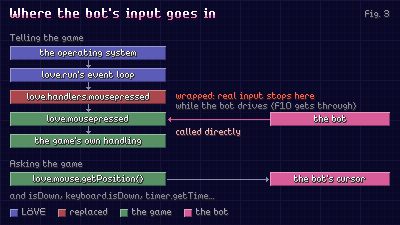
A few other functions reach outside the game, and they caught me out. The bug-fix minigame pauses when the window loses focus, so every run that wasn't the front window stalled, and love.window.hasFocus now says yes while the bot drives. A bot that clicks around will click the Discord and Steam links, so love.system.openURL logs the address and opens nothing. And one effect pulls the cursor with love.mouse.setPosition, which has to move the bot's cursor too, or the bot loses track of where it is.
F10 still gets through. It hands the controls to me and back again, so when a run does something odd I can take over right there.
Clicking takes time#
A click takes time: move over the button, let the hover land, press, hold, release. As a state machine that's a tangle of "what was I doing last frame". As a coroutine it reads like the description:
MoveTo(button.x, button.y)
Wait(0.05)
Press()
Wait(0.08)
Release()
A coroutine is a function that can pause mid-way with coroutine.yield() and carry on from the same line when coroutine.resume() is called, its locals intact. The bot is one coroutine, resumed once per game frame with that frame's dt, and anything that takes time is a loop that yields once a frame:
function Wait(seconds)
    local waited = 0
    while waited < seconds do
        waited = waited + coroutine.yield()
    end
end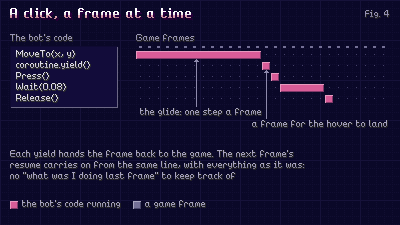
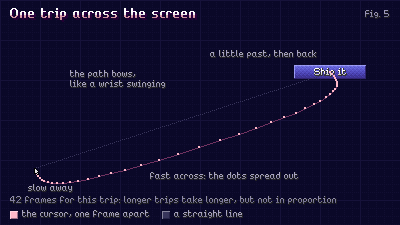
Because the bot advances one game frame per resume, its hand moves at game speed: eight times as fast in a soak, a person's pace in footage. The glide eases in and out, curves slightly the way a wrist swings, and takes a little longer for longer trips. In footage it also overshoots and settles back. That's all for the camera: the same bot films the trailer, and a cursor moving in straight lines looks robotic.
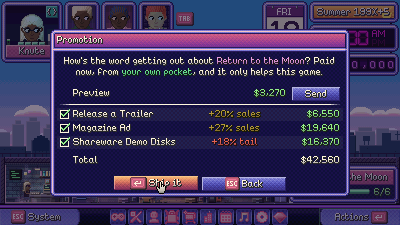
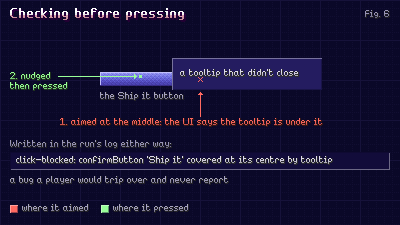
Before pressing, the bot asks the UI what's under the cursor. If it isn't the target, something is in the way. The bot nudges around the button like a person would, and logs what was covering it. A lot of its most useful reports are these missed clicks, because a player who hits one usually just clicks again and never mentions it.
Knowing what can be pressed#
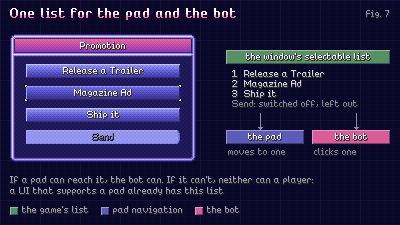
The bot needs a list of what can be clicked right now. Vaporware already had one, because the game plays with a gamepad, and pad navigation needs exactly that list. The bot reads the same one (each window's SelectableComponentIter), so it can reach exactly what a player can. If your UI supports a pad, you probably have this list already.
Deciding what to press#
Each decision goes one of three ways:
- Chaos, 4% of the time: a random click, key, or scroll. A sensible bot only walks paths I've already tested, and chaos is what presses Escape in the middle of a montage. It can't press Quit or the Discord and Steam links.
- A driver, for windows where a choice matters: one function per window, doing one step per decision. The desk's driver is the strategy (pitch, plan the deal, work, run QA, ship). There are about 25, and they're most of the 4,000 lines that know Vaporware. The other 1,500 (clock, hands, reports) know nothing about it.
- The generic driver, for every other window, and for any driver with nothing to do for six goes.
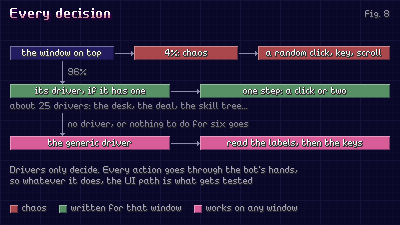
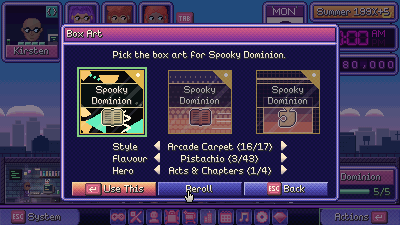
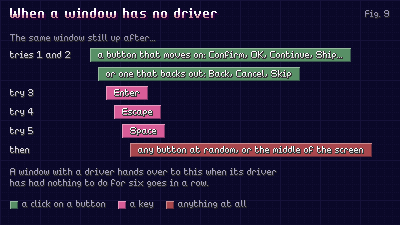
Most windows only ever see the generic driver. It reads the button labels and prefers ones that move on (Confirm, OK, Ship), then ones that back out. If the window's still there, it works down a list: Enter, Escape, Space, any button, the middle of the screen. A popup I add tonight gets played in tomorrow's run without any bot code, and if nothing on the list gets past it, that's reported.
Noticing when it breaks#
A run that stops at its first crash only finds one bug a night, so the run watches for four kinds of trouble and keeps going after each.
The first is crashes. Each frame's bot, update, and draw run guarded. xpcall is pcall plus a handler that runs before the stack unwinds, so debug.traceback there gets the whole stack. A crash in draw leaves its canvas, shader, and transforms set, and presenting with a canvas bound is a second error that can't be caught, so the run pops and resets those first. When coroutine.resume returns false, the stack says whether the bot broke or the game code its click ran. Then every window closes and the run carries on from the title.
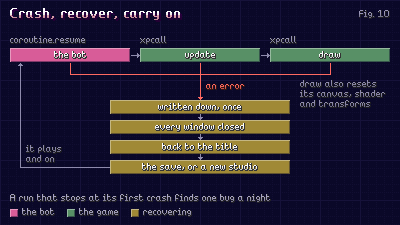
Then there are stuck states, where nothing has crashed but nothing can move the game on. Once a second the run fingerprints the state (day, money, Focus, XP, Content, bugs, games shipped). Ninety seconds of game time without a change means stuck, and it climbs a ladder: Escape, then close the top window, then continue the save from the title, then a new studio.
Freezes are harder, because a frame that never ends can't be caught from its own thread. A second thread, started with love.thread, waits on a channel the game writes to once a second. channel:demand(60) returns nothing after 60 silent seconds, and the thread logs the freeze and ends the process. A batch script moves on instead of waiting forever.
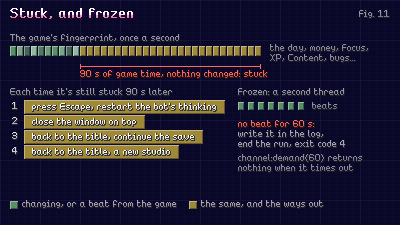
Last, broken rules. Every five seconds of game time the run checks what must always hold: money is a real number, Focus is in range, XP isn't negative, no one's over the level cap, the window stack stays small. None of these would crash the game, so without the check they could go unnoticed for a long time.
Each distinct problem is written to its own file, once: the error and stack, what was open, where the playthrough was, and the bot's last 60 actions. Repeats are counted, so a bug that fires every frame for an hour is one file with a big number. The exit code says clean, crashed, stalled, or frozen.
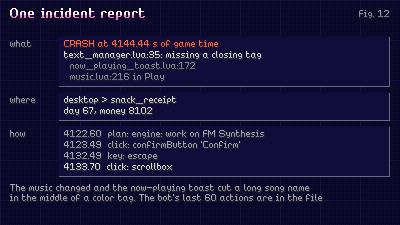
The first balance batch also turned up two bugs a player could hit, just less often than a bot running at 64 times speed. A montage that moved on before it finished draining a developer's Focus left a fraction behind, and a bug fix right after could push it below zero (the Focus rule caught it). And a timer meant to fire once threw an error when it did, so it was called again, and threw again, every frame.
Watch the bot too#
The bot's numbers are only as good as the way it plays, so I watch it before trusting them.
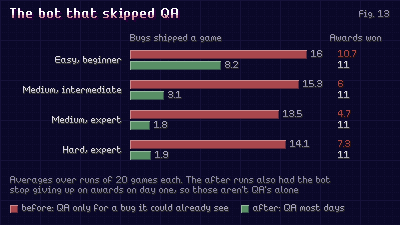
Vaporware's bot only ran QA when it could already see a bug. Then shipped bugs started costing review score, and every batch I ran measured a player who ignored QA: nearly every bug shipped, ranks fell to Bs and Cs, and the game looked much harder than it was. Once it checked QA most days and before shipping, the bot shipped 2 to 8 bugs a game instead of 13 to 16. The same change stopped it giving up on awards on day one, so not all of the awards gain is down to QA.
The 84 bug-fix microgames needed the same care. Each has a bot built in, and a sweep plays every one a hundred times at each speed as four players of different skill.
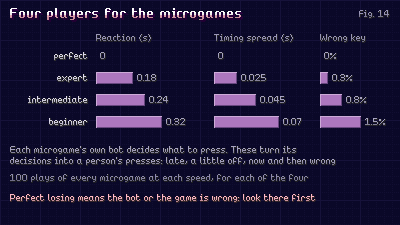
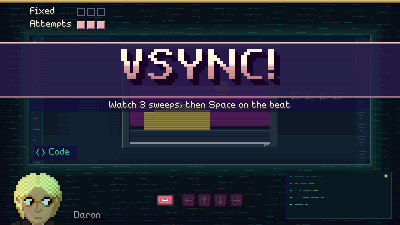
On the first sweep, the perfect player (no delay, no mistakes) lost on ten. Every one was a bot that played wrong (it steered one way only, or let go too late at speed) or a microgame that couldn't always be won: FALLOFF! and RACE! could box the player in. The bots and games were fixed, and now the perfect player wins 99 to 100% of every microgame at every speed.
The player sees it too#
Leave Vaporware EX on its title screen for ten seconds and it plays a demo of itself, like an arcade cabinet: a made-up mid-game studio, a couple of work montages, a cartridge shipped, the reviews, maybe an award. It has a worn VHS look, so it reads as a recording. Touching anything goes back to the title, and nothing from the demo is saved, not even achievements or tips.
It's the same idea as the bot: a coroutine script, a frame at a time, driving the real menus and montages. It doesn't inject input, because it only has a few set-pieces to reach: its own cursor glides to a button, then the script calls what the button would. The trailer's shots are made the same way, but those do go through the bot's clicks, which is why the cursor in the trailer moves like a person's.
The same clock serves the other tools. Perf mode records frame times per screen and samples the Lua stack. Footage mode records at 1920x1080 on a perfectly even clock, so when I need a clip of a launch, I let a bot play and pick the moment out afterwards.
A bot for your own game#
The download is a small version of all this for LÖVE 11.5 and 12: a tiny game (work for money, ship once there's enough, read the reviews) and a bot playing it from the first frame at eight times speed. One bug is planted. The sensible bot never hits it, and chaos usually finds it within half a minute. F10 takes the controls and hands them back. Each problem goes once to incidents.txt in the save folder, with the bot's last actions.
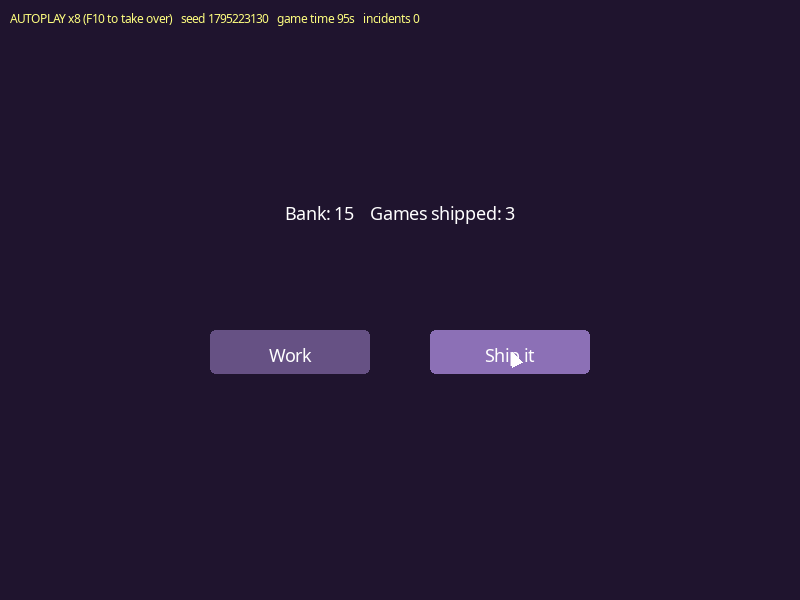
First, the game. It knows nothing about the bot. The one thing it does for it, Pressables, is the list a pad's navigation would use anyway:
-- game.lua: a very small game for the bot to play. Work for money, ship a game once there's enough, read the reviews
local Game = {}
Game.__index = Game

local SHIP_COST = 10
-- the planted bug: there's no review for 13 or more in the bank, so shipping then breaks
local REVIEWS = { [10] = "Solid.", [11] = "Fun!", [12] = "A hit!" }

local function newButton(label, x, y)
    return { label = label, x = x, y = y, w = 160, h = 44, enabled = true }
end

function Game.new()
    local game = setmetatable({}, Game)
    game.font = love.graphics.newFont(18)
    game.play = newButton("Play", 320, 300)
    game.work = newButton("Work", 210, 330)
    game.ship = newButton("Ship it", 430, 330)
    game.ok = newButton("OK", 320, 360)
    game:ToTitle()
    return game
end

function Game:ToTitle()
    self.screen = "title"
    self.money = 0
    self.shipped = 0
    self.popup = nil
    self.held = nil
    self.hovered = nil
end

-- what can be pressed right now, and whether each one is switched on: what a pad would move between, and what the
-- bot reads
function Game:Pressables()
    if self.popup then
        -- a popup ignores presses for a moment, so a click meant for the screen under it doesn't close it
        self.ok.enabled = love.timer.getTime() >= self.popup.readyAt
        return { self.ok }
    elseif self.screen == "title" then
        return { self.play }
    end
    self.ship.enabled = self.money >= SHIP_COST
    return { self.work, self.ship }
end

function Game:ButtonAt(x, y)
    for _, button in ipairs(self:Pressables()) do
        if button.enabled and x >= button.x and x < button.x + button.w and y >= button.y
            and y < button.y + button.h then
            return button
        end
    end
    return nil
end

function Game:Update()
    self.hovered = self:ButtonAt(love.mouse.getPosition())
end

-- a press acts on the release, and only on the button it went down on
function Game:MousePressed(x, y, mouseButton)
    if mouseButton == 1 then
        self.held = self:ButtonAt(x, y)
    end
end

function Game:MouseReleased(x, y, mouseButton)
    if mouseButton ~= 1 or not self.held then
        return
    end
    local pressed = self.held
    self.held = nil
    if self:ButtonAt(x, y) == pressed then
        self:Press(pressed)
    end
end

function Game:KeyPressed(key)
    if key == "escape" and self.screen == "desk" and not self.popup then
        self:ToTitle()
    elseif key == "return" and self.popup and love.timer.getTime() >= self.popup.readyAt then
        self.popup = nil
    end
end

function Game:Press(button)
    if button == self.play then
        self.screen = "desk"
    elseif button == self.work then
        self.money = self.money + love.math.random(1, 3)
    elseif button == self.ship then
        self:Ship()
    elseif button == self.ok then
        self.popup = nil
    end
end

function Game:Ship()
    local review = REVIEWS[self.money]
    self.popup = { text = "Game " .. (self.shipped + 1) .. " is out! The reviews say: " .. review,
        readyAt = love.timer.getTime() + 0.5 }
    self.money = 0
    self.shipped = self.shipped + 1
end

-- everything the screen shows that should change while someone's playing: when it stops changing, nothing's happening
function Game:Fingerprint()
    return table.concat({ self.screen, self.money, self.shipped, self.popup and "popup" or "-" }, "|")
end
-- game.lua (part 2)
function Game:DrawButton(button)
local shade = not button.enabled and 0.22 or (button == self.hovered and 0.55 or 0.4)
love.graphics.setColor(shade, shade * 0.8, shade * 1.3)
love.graphics.rectangle("fill", button.x, button.y, button.w, button.h, 6)
love.graphics.setColor(1, 1, 1, button.enabled and 1 or 0.4)
love.graphics.printf(button.label, button.x, button.y + 12, button.w, "center")
end
function Game:Draw()
love.graphics.clear(0.12, 0.08, 0.18)
love.graphics.setFont(self.font)
love.graphics.setColor(1, 1, 1)
if self.screen == "title" then
love.graphics.printf("A GAME ABOUT MAKING GAMES", 0, 200, 800, "center")
self:DrawButton(self.play)
else
love.graphics.printf(string.format("Bank: %d Games shipped: %d", self.money, self.shipped), 0, 200, 800,
"center")
self:DrawButton(self.work)
self:DrawButton(self.ship)
end
if self.popup then
love.graphics.setColor(0.05, 0.03, 0.08, 0.92)
love.graphics.rectangle("fill", 150, 250, 500, 170, 8)
love.graphics.setColor(1, 1, 1)
love.graphics.printf(self.popup.text, 170, 280, 460, "center")
self:DrawButton(self.ok)
end
-- the game draws its own cursor where love.mouse says it is, so you can watch the bot's hand
local x, y = love.mouse.getPosition()
love.graphics.setColor(1, 1, 1)
love.graphics.polygon("fill", x, y, x, y + 16, x + 11, y + 11)
end
return GameThen the bot. First its state, and taking over the clock and the input:
-- autoplay.lua: the game plays itself through its own input. A virtual clock, mouse and keyboard, a bot that
-- drives them from a coroutine, and guards that write down what broke and carry on
local Autoplay = {}
Autoplay.__index = Autoplay

-- the event loop's input events: dropped while the bot drives, so a nudge of the real mouse can't fight it
local INPUT_EVENTS = { "mousepressed", "mousereleased", "mousemoved", "wheelmoved", "keypressed", "keyreleased",
    "textinput", "touchpressed", "touchreleased", "touchmoved", "gamepadpressed", "gamepadreleased", "gamepadaxis" }

local STEP = 1 / 60       -- one game frame, always the same length
local STALL_SECONDS = 30  -- game time with nothing changing before it counts as stuck
local CHAOS = 0.15        -- the chance a decision is a random press instead

function Autoplay.new(game, seed)
    local autoplay = setmetatable({}, Autoplay)
    autoplay.game = game
    autoplay.seed = seed or os.time()
    autoplay.rng = love.math.newRandomGenerator(autoplay.seed + 1)
    autoplay.stepsPerFrame = 8 -- game frames per drawn frame: the game runs eight times as fast
    autoplay.driving = true
    autoplay.now = 0
    autoplay.delta = STEP
    autoplay.mouse = { x = 400, y = 300, down = {} }
    autoplay.keys = {}
    autoplay.real = {}
    autoplay.lastActions = {}
    autoplay.incidents = {}
    autoplay.incidentCount = 0
    autoplay.fingerprint = nil
    autoplay.unchangedSince = 0
    autoplay.statusFont = love.graphics.newFont(12)
    return autoplay
end

function Autoplay:Install()
    local real = self.real
    real.getPosition, real.mouseIsDown = love.mouse.getPosition, love.mouse.isDown
    real.keyIsDown = love.keyboard.isDown
    love.math.setRandomSeed(self.seed)

    -- the clock is always the virtual one, even while a person plays, so time never jumps when they take over
    love.timer.getTime = function() return self.now end
    love.timer.getDelta = function() return self.delta end
    love.mouse.getPosition = function()
        if not self.driving then return real.getPosition() end
        return self.mouse.x, self.mouse.y
    end
    love.mouse.isDown = function(...)
        if not self.driving then return real.mouseIsDown(...) end
        for _, button in ipairs({ ... }) do
            if self.mouse.down[button] then return true end
        end
        return false
    end
    love.keyboard.isDown = function(...)
        if not self.driving then return real.keyIsDown(...) end
        for _, key in ipairs({ ... }) do
            if self.keys[key] then return true end
        end
        return false
    end

    -- real events: F10 swaps who's playing, and everything else only gets through while a person is
    for _, name in ipairs(INPUT_EVENTS) do
        local original = love.handlers[name]
        if original then
            love.handlers[name] = function(...)
                if name == "keypressed" and (...) == "f10" then
                    self:SetDriving(not self.driving)
                elseif not self.driving then
                    return original(...)
                end
            end
        end
    end
    self:RestartBrain()
end

function Autoplay:SetDriving(driving)
    self:ReleaseAll()
    self.driving = driving
end
Next, the bot's injected input and its hands. Each coroutine.yield() is one game frame:
-- autoplay.lua (part 2)
-- INJECTION: the same callbacks the event loop would call, so everything after this is the game's real input path
function Autoplay:InjectMove(x, y)
    local dx, dy = x - self.mouse.x, y - self.mouse.y
    self.mouse.x, self.mouse.y = x, y
    if love.mousemoved then love.mousemoved(x, y, dx, dy, false) end
end

function Autoplay:InjectPress(button)
    self.mouse.down[button] = true
    if love.mousepressed then love.mousepressed(self.mouse.x, self.mouse.y, button, false, 1) end
end

function Autoplay:InjectRelease(button)
    self.mouse.down[button] = nil
    if love.mousereleased then love.mousereleased(self.mouse.x, self.mouse.y, button, false, 1) end
end

function Autoplay:InjectKeyRelease(key)
    self.keys[key] = nil
    if love.keyreleased then love.keyreleased(key, key) end
end

-- let go of everything (after a crash, or when a person takes over)
function Autoplay:ReleaseAll()
    for button in pairs(self.mouse.down) do self:InjectRelease(button) end
    for key in pairs(self.keys) do self:InjectKeyRelease(key) end
end

-- HANDS: these run inside the bot's coroutine and yield once a game frame, so a glide or a held button takes game
-- time the way a player's would
function Autoplay:Wait(seconds)
    local waited = 0
    while waited < seconds do
        waited = waited + coroutine.yield()
    end
end

function Autoplay:MoveTo(x, y)
    local fromX, fromY = self.mouse.x, self.mouse.y
    local distance = math.sqrt((x - fromX) ^ 2 + (y - fromY) ^ 2)
    -- longer trips take longer, but not in proportion (roughly Fitts's law)
    local duration = 0.15 + 0.1 * math.log(1 + distance / 20) / math.log(2)
    local elapsed = 0
    while elapsed < duration do
        elapsed = elapsed + coroutine.yield()
        local t = math.min(elapsed / duration, 1)
        local eased = t * t * (3 - 2 * t) -- slow away, fast across, slow onto the target
        self:InjectMove(fromX + (x - fromX) * eased, fromY + (y - fromY) * eased)
    end
end

function Autoplay:Click(button)
    -- somewhere near the middle, not dead center every time
    local x = button.x + button.w * (0.3 + self.rng:random() * 0.4)
    local y = button.y + button.h * (0.3 + self.rng:random() * 0.4)
    self:MoveTo(x, y)
    coroutine.yield() -- a frame for the game to notice what's under the cursor
    -- did the game see it where the bot aimed? If not, something's in the way, and that's worth knowing
    if self.game.hovered ~= button then
        local under = self.game.hovered and self.game.hovered.label or "nothing"
        self:Note("missed " .. button.label .. ": the game had " .. under .. " under the cursor")
    end
    self:Note("click " .. button.label)
    self:InjectPress(1)
    self:Wait(0.05 + self.rng:random() * 0.05)
    self:InjectRelease(1)
end

function Autoplay:Key(key)
    self:Note("key " .. key)
    self.keys[key] = true
    if love.keypressed then love.keypressed(key, key, false) end
    self:Wait(0.05)
    self:InjectKeyRelease(key)
end
The decision code is the generic driver from earlier, cut down: buttons whose labels move the game on come first, and now and then it does something random:
-- autoplay.lua (part 3)
-- BRAIN: look at what can be pressed, pick one, press it, read for a moment. Labels that move the game on win
local PREFERRED = { "ok", "ship", "play" }

function Autoplay:Choose(buttons)
    for _, word in ipairs(PREFERRED) do
        for _, button in ipairs(buttons) do
            if button.label:lower():find(word, 1, true) then
                return button
            end
        end
    end
    return buttons[self.rng:random(#buttons)]
end

function Autoplay:Play()
    while true do
        local buttons = {}
        for _, button in ipairs(self.game:Pressables()) do
            if button.enabled then
                table.insert(buttons, button)
            end
        end
        -- chaos: a press a sensible player wouldn't make, which finds the bugs they never walk into
        if self.rng:random() < CHAOS then
            if #buttons > 0 and self.rng:random() < 0.8 then
                self:Click(buttons[self.rng:random(#buttons)])
            else
                self:Key(self.rng:random() < 0.5 and "escape" or "return")
            end
        elseif #buttons > 0 then
            self:Click(self:Choose(buttons))
        end
        self:Wait(0.2 + self.rng:random() * 0.3)
    end
end

function Autoplay:RestartBrain()
    self.brain = coroutine.create(function() self:Play() end)
end
And the loop that steps it all, with the guards. The game's update and the bot's coroutine are each guarded, and anything that goes wrong is written down once, then the game goes back to the title and the run carries on:
-- autoplay.lua (part 4)
-- in place of the game's update: several fixed game frames per drawn frame while the bot drives, real time when a
-- person does
function Autoplay:RunFrame(realDt, update)
    if not self.driving then
        self.now, self.delta = self.now + realDt, realDt
        update(realDt)
        return
    end
    for _ = 1, self.stepsPerFrame do
        self:Step(update)
    end
end

-- one game frame: the bot, then the game, each guarded, then the stall check
function Autoplay:Step(update)
    self.now, self.delta = self.now + STEP, STEP
    local ok, err = coroutine.resume(self.brain, STEP)
    if not ok then
        -- it came out of the bot's coroutine, but a click runs game code: the stack says whose bug it is
        self:Incident("crash", err, debug.traceback(self.brain, err))
        return
    end
    ok, err = xpcall(update, debug.traceback, STEP)
    if not ok then
        self:Incident("crash", err)
        return
    end
    self:Watch()
end

-- stuck: nothing the game would show has changed for a while of game time
function Autoplay:Watch()
    local fingerprint = self.game:Fingerprint()
    if fingerprint ~= self.fingerprint then
        self.fingerprint, self.unchangedSince = fingerprint, self.now
    elseif self.now - self.unchangedSince > STALL_SECONDS then
        self:Incident("stall", "nothing changed for " .. STALL_SECONDS .. "s at " .. fingerprint)
    end
end

function Autoplay:Note(action)
    table.insert(self.lastActions, string.format("%8.2fs  %s", self.now, action))
    if #self.lastActions > 20 then
        table.remove(self.lastActions, 1)
    end
end

-- written down once per distinct problem (repeats are counted), with what the bot did leading up to it. Then the
-- game goes back to the title, and the run carries on
function Autoplay:Incident(kind, message, detail)
    local key = kind .. ": " .. tostring(message):match("^[^\n]*")
    local count = (self.incidents[key] or 0) + 1
    self.incidents[key] = count
    self.incidentCount = self.incidentCount + 1
    self.lastIncident = key
    if count == 1 then
        local lines = { string.format("%s at %.2fs (seed %d)", kind:upper(), self.now, self.seed), "",
            tostring(detail or message), "", "The bot's last actions:" }
        for _, action in ipairs(self.lastActions) do
            table.insert(lines, action)
        end
        love.filesystem.append("incidents.txt", table.concat(lines, "\n") .. "\n\n")
        print(key)
    end
    -- to the title first, so letting go of the mouse can't press anything in the screen that broke
    self.game:ToTitle()
    self:ReleaseAll()
    self:RestartBrain()
    self.fingerprint, self.unchangedSince = nil, self.now
end

function Autoplay:DrawStatus()
    love.graphics.setFont(self.statusFont)
    love.graphics.setColor(1, 1, 0.5)
    local who = self.driving and string.format("AUTOPLAY x%d (F10 to take over)", self.stepsPerFrame)
        or "YOU (F10 hands back)"
    love.graphics.print(string.format("%s   seed %d   game time %ds   incidents %d", who, self.seed,
        math.floor(self.now), self.incidentCount), 10, 10)
    if self.lastIncident then
        love.graphics.print("last: " .. self.lastIncident, 10, 28)
    end
end

return Autoplay
Finally, main.lua hands love.update to the bot's loop. That's the only change your own game needs:
-- main.lua: the game, played by the bot from the first frame. F10 takes the controls and hands them back, and
-- incidents.txt in the save folder lists what broke
local Game = require("game")
local Autoplay = require("autoplay")

local App = {}

function love.load()
    love.mouse.setVisible(false)
    App.game = Game.new()
    App.autoplay = Autoplay.new(App.game)
    App.autoplay:Install()
    print("autoplay: seed " .. App.autoplay.seed .. ", incidents go to "
        .. love.filesystem.getSaveDirectory() .. "/incidents.txt")
end

function love.update(dt)
    App.autoplay:RunFrame(dt, function() App.game:Update() end)
end

function love.draw()
    App.game:Draw()
    App.autoplay:DrawStatus()
end

function love.mousepressed(x, y, button) App.game:MousePressed(x, y, button) end
function love.mousereleased(x, y, button) App.game:MouseReleased(x, y, button) end
function love.keypressed(key) App.game:KeyPressed(key) end
Leave it running, and before long incidents.txt has this in it. The stack runs from the game's bug back through the game's own click handling to the bot's hand, and the bot's last actions say how it got there: a chaos pick of Work after it could already have shipped, then Ship it.
CRASH at 129.68s (seed 1795222853)

game.lua:101: attempt to concatenate local 'review' (a nil value)
stack traceback:
	game.lua: in function 'Ship'
	game.lua:93: in function 'Press'
	game.lua:75: in function 'MouseReleased'
	main.lua:27: in function 'mousereleased'
	autoplay.lua:99: in function 'InjectRelease'
	autoplay.lua:150: in function 'Click'
	autoplay.lua:192: in function 'Play'

The bot's last actions:
  ...
  127.07s  click Work
  127.78s  click Work
  128.65s  click Work
  129.60s  click Ship it
To put it on your own game: call RunFrame from your love.update, give it your game's Pressables (or your pad navigation's list) and a Fingerprint, and replace Choose with drivers for the screens where a choice matters. Things the sample leaves out, which the real one has: the draw guard, the invariants, the freeze thread, and the rest of the input functions (getX, getY, hasFocus, openURL).
The whole sample#
All 3 files from this post, put together: about 460 lines of plain Lua for LÖVE 11.5.
Run it as it is with love autoplay-sample.zip, or unzip it and run love . in the folder.